Last week, our agent traced a flaky test to a dependency bump three weeks prior. It did this by writing its own SQL queries, scanning hundreds of millions of log lines across a dozen queries, and following a trail from job metadata to raw log output. The whole investigation took seconds.
To do this, the agent needs context: not one log file, but every build, every test, every log line, across months of history. Every week, about 1.5 billion CI log lines and 700K jobs flow through our system. All of it lands in ClickHouse, compressed at 35:1. All of it is queryable in milliseconds.
A SQL interface for the agent
We expose a SQL interface to the agent, scoped to the organization it's investigating. The agent constructs its own queries based on the question. No predefined query library, no rigid tool API.
LLMs are good at SQL. There's an enormous amount of SQL in training data, and the syntax maps well to natural-language questions about data. A constrained tool API like get_failure_rate(workflow, days) would limit the agent to the questions we anticipated. A SQL interface lets it ask questions we never thought of, which matters when you're debugging novel failures.
The agent queries two main targets:
Job metadata: a materialized view with one row per CI job execution. The agent uses this 63% of the time for questions like "how often does this fail?", "what's the success rate?", "which jobs are slowest?", "when did this start failing?"
Raw log lines: one row per log line. The agent uses this 37% of the time for questions like "show me the error output for this job", "when did this log pattern first appear?", "how often does this error message occur across runs?"
52,000 queries across 8,500 investigations
We analyzed 8,534 agent sessions and 52,312 queries from our observability pipeline.
The agent doesn't stop at one query. It investigates. Starts broad, then drills in. Total rows scanned across all queries to answer one question:
| Target | Sessions | Avg queries | Median rows | P75 | P95 |
|---|---|---|---|---|---|
| Job metadata | 8,210 | 4.0 | 164K | 563K | 4.4M |
| Raw log lines | 5,413 | 3.5 | 4.4M | 69M | 4.3B |
| Combined | 8,534 | 4.4 | 335K | 5.2M | 940M |
The typical question scans 335K rows across about 3 queries. At P75 it's 5.2 million rows. At P95 it's 940 million rows. The heaviest raw-log sessions, deep investigations tracing error patterns across months of history, scan 4.3 billion rows.
The search pattern
The agent starts broad and narrows. A typical investigation begins with job metadata: "what's the failure rate for this workflow?", "which jobs failed on this commit?" These are cheap queries (median 47K rows) against a compact, pre-aggregated materialized view.
When it finds something interesting, it drills into raw logs: "show me the stack trace for this specific failure", "has this error message appeared before?" These are the expensive queries (median 1.1M rows), full-text scans across log output. But this is exactly the kind of search that would take a human minutes of scrolling through GitHub Actions log viewers.
The agent averages 4.4 queries per session, but heavy investigations issue many more. A P95 session isn't one big query. It's the agent following a trail, query after query, as it narrows in on a root cause.
5 TiB uncompressed, 154 GiB on disk
For the agent to query this fast, the data needs to be structured for it. Up to 300 million log lines flow through on a busy day. We use ClickHouse.
The denormalization bet
Every log line in our system carries 48 columns of metadata: the full context of the CI run it belongs to. Commit SHA, author, branch, PR title, workflow name, job name, step name, runner info, timestamps, and more.
In a traditional row-store, this would be insane. You'd normalize. Run-level metadata in one table, job metadata in another, join at query time. Denormalizing 48 columns onto every single log line sounds like a storage disaster.
In ClickHouse's columnar format, it's essentially free.
A column like commit_message has the same value for every log line in a CI run, and a single run can produce thousands of log lines. ClickHouse stores those thousands of identical values in sequence. The compression algorithm sees the repetition and compresses it to almost nothing.
| Column | Compression ratio | Why |
|---|---|---|
commit_message | 301:1 | Same message for every line in a run (thousands of lines) |
display_title | 160:1 | Same PR/commit title across all lines |
workflow_path | 79:1 | Same .github/workflows/foo.yml path |
step_name | 52:1 | Same step name across hundreds of lines |
job_name | 48:1 | Same job name across hundreds/thousands of lines |
The agent asks arbitrary questions. One might filter by commit author, the next by runner label, the next by step name. Without denormalization, every one of those requires a join. With it, they're all column predicates.
The numbers
| Layer | Size |
|---|---|
Raw log text (line_content uncompressed) | 664 GiB |
| All 48 columns uncompressed | 5.31 TiB |
| On disk (compressed) | 154 GiB |
| Compression ratio | 35:1 |
The raw log text alone is 664 GiB. Adding all 48 columns of metadata inflates it to 5.31 TiB uncompressed, 8x the raw text. On disk, the whole thing compresses to 154 GiB. ClickHouse stores 8x more data (all the enriched metadata) in a quarter of the size of the raw text alone.
That's about 21 bytes per log line on disk, including all 48 columns. Yes, really. 21 bytes for a log line plus its commit SHA, author, branch, job name, step name, runner info, and 41 other fields.
Where the storage actually goes
Not all columns compress equally. The unique-per-row columns (log text, timestamp, line number) compress modestly and dominate storage. The metadata columns, which repeat across thousands of lines, are nearly free.
| Column | On disk | % of total | Compression ratio |
|---|---|---|---|
line_content (log text) | 53.2 GiB | 34.7% | 12.5:1 |
ts (nanosecond timestamp) | 15.7 GiB | 10.2% | 3.7:1 |
line_number | 12.4 GiB | 8.1% | 2.3:1 |
job_name | 8.2 GiB | 5.4% | 48:1 |
runner_name | 4.5 GiB | 2.9% | 31:1 |
job_id | 3.9 GiB | 2.5% | 15:1 |
runner_labels | 3.8 GiB | 2.5% | 52:1 |
| Everything else (41 columns) | ~51 GiB | ~33% | varies |
The top three (line_content, ts, line_number) account for 53% of all storage. Everything else is repeated metadata that compresses to almost nothing.
Query performance
We use a few ClickHouse patterns that keep things fast:
Primary key design means the data is physically sorted for our access pattern. The sort order is (org, ts, repository, run_id, ...), so every query is scoped to one organization and a time range, and ClickHouse skips everything else without reading it.
Skip indexes let ClickHouse avoid scanning data it doesn't need. We use bloom filters on 14 columns (org, repository, job name, branch, commit SHA, etc.) and an ngram bloom filter on line_content for full-text search. When the agent searches for an error message across billions of log lines, ClickHouse checks the ngram index to skip granules that can't contain the search term, turning a full table scan into a targeted read.
Materialized views pre-compute aggregations on insert. When the agent asks "what's the failure rate for this workflow over the last 30 days?", the answer is already computed. The aggregation happened when the data was written.
Async inserts give us high write throughput without building our own batching layer. We fire-and-forget individual inserts, and ClickHouse batches them internally.
Query latency across 52K queries:
| Target | Queries | Median | P75 | P95 |
|---|---|---|---|---|
| Job metadata | 33K | 20ms | 30ms | 80ms |
| Raw log lines | 19K | 110ms | 780ms | 18.1s |
Job metadata queries return in 20ms at the median. Raw log queries, scanning a million rows at the median, come back in 110ms.
Latency scales roughly linearly with rows scanned:
| Rows scanned | Queries | Median latency | P95 latency |
|---|---|---|---|
| < 1K | 1,621 | 10ms | 50ms |
| 1K-10K | 2,608 | 20ms | 50ms |
| 10K-100K | 27,044 | 20ms | 50ms |
| 100K-1M | 8,515 | 40ms | 390ms |
| 1M-10M | 7,199 | 90ms | 1.2s |
| 10M-100M | 2,630 | 690ms | 6.8s |
| 100M-1B | 1,814 | 6.8s | 30.6s |
| 1B+ | 1,029 | 31s | 82s |
10x more rows ≈ 10x more latency. 60% of all queries scan under 100K rows and return in under 50ms, fast enough that the agent can fire off several per second without breaking stride. At the extreme end, the agent occasionally scans over a billion rows in a single query; even those complete in about 30 seconds at the median.
Ingesting through GitHub's rate limit
None of the above works without fresh data. The agent needs to reason about the build that just failed, not one from an hour ago.
The rate limit constraint
GitHub's API gives you 15,000 requests per hour per App installation (5,000 on non-Enterprise plans). That sounds generous until you're continuously polling workflow runs, jobs, steps, and log output across dozens of active repositories. A single commit can spawn hundreds of parallel jobs, each producing logs you need to fetch.
And ingestion isn't the only thing hitting the API. When the agent investigates a failure, it pulls PR metadata, reads file diffs, posts comments, and opens pull requests. All of that counts against the same 15,000-request budget. Throttle ingestion too aggressively and your data goes stale. Throttle too little and you starve the agent of the API access it needs to do its job.
Early on, we hit this. Our ingestion would slam into the rate limit, get blocked for the remainder of the hour, and fall behind. By the time it caught up, we were ingesting logs from 30+ minutes ago. For an agent that needs to reason about the build that just failed, that's useless. If an engineer has to wait for the agent to catch up, they've already context-switched to investigating manually.
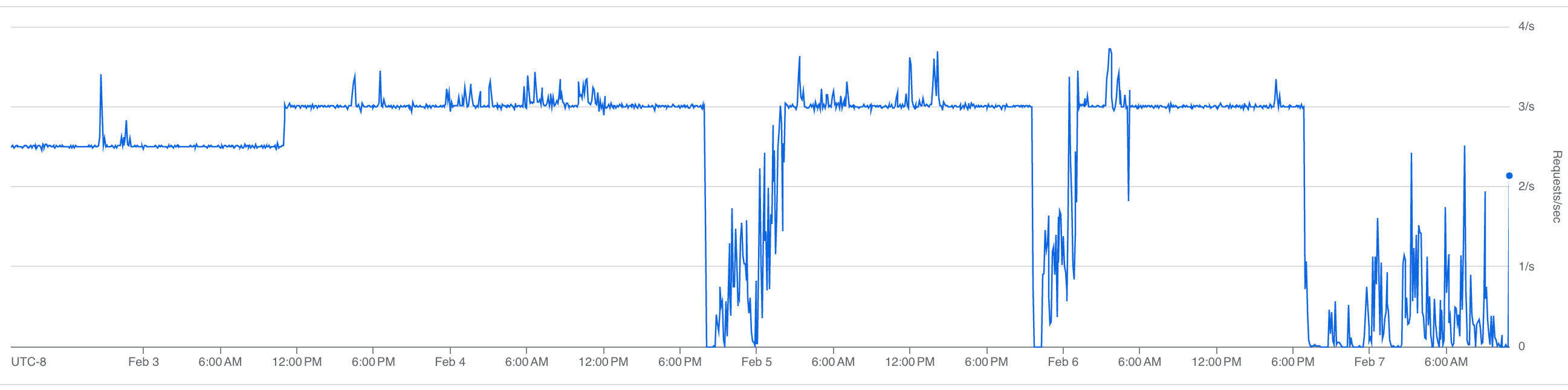
The fix was throttling: spreading requests evenly across the rate limit window instead of bursting. We cap ingestion at roughly 3 requests per second, keeping about 4,000 requests per hour free for the agent.
Our sustained request rate:
Our rate limit budget over time:
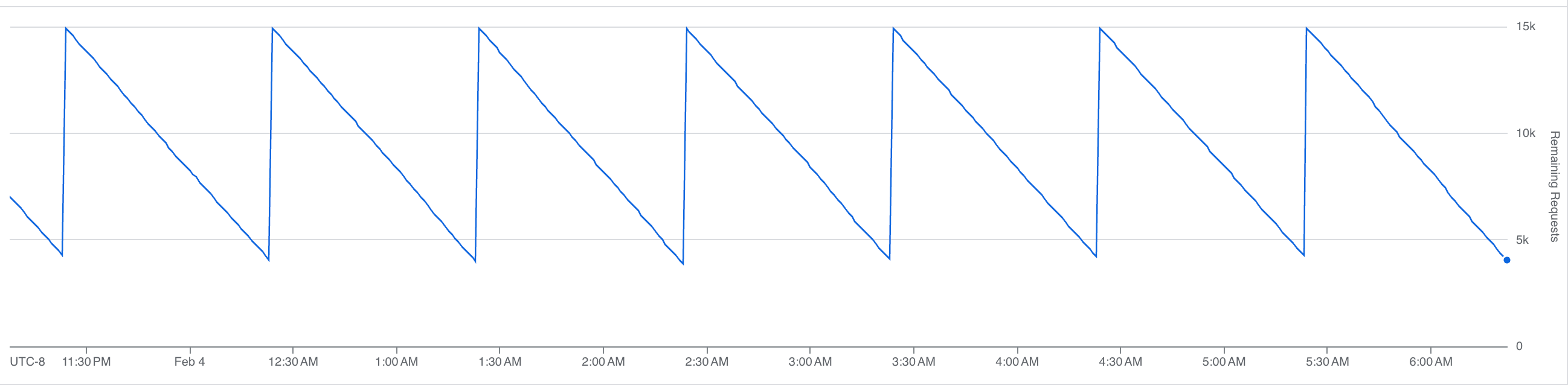
That sawtooth is the steady state. Each downward slope is us consuming API calls; each vertical jump is the hourly limit resetting. At peak, we burn through most of the budget before the window resets, with headroom left for the agent.
Once we trusted the throttling, we pushed the ingestion rate about 20% higher:
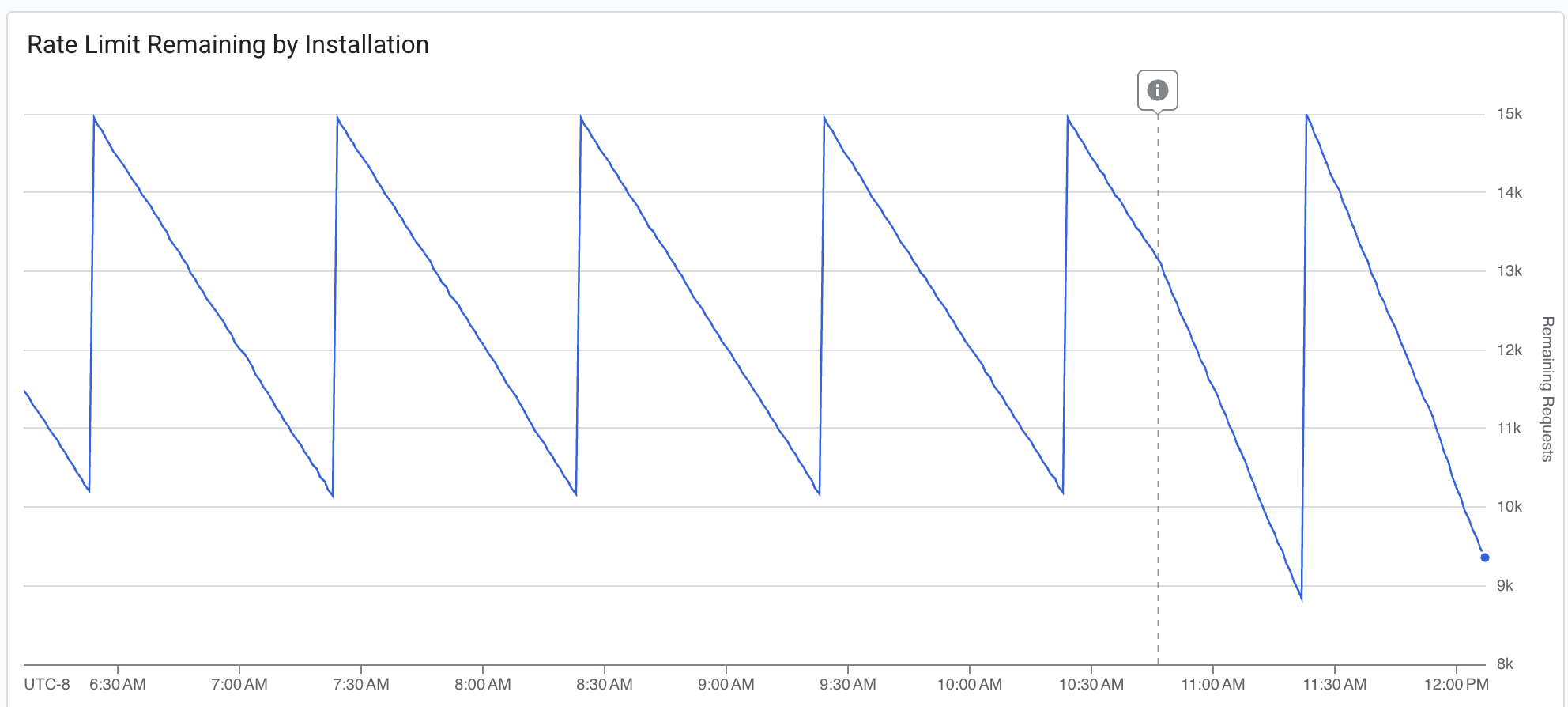
The dashed line marks the deployment. The budget draws down more aggressively after the change. We're consuming more of the available headroom per window, while still never fully exhausting it. Fresher data, acceptable margin.
We target under 5 minutes at P95 for ingestion delay, the time between an event happening on GitHub and it being queryable in our system. Most of the time, we're at a few seconds.
Durable execution
Both our ingestion pipeline and our agent run on Inngest, a durable execution engine. When either one hits a rate limit, it doesn't crash, retry blindly, or spin in a loop. It suspends.
GitHub's rate limit response headers tell you exactly how long you need to wait. We read that value, add 10% jitter to avoid a thundering herd when the limit resets, and suspend the execution. The full state is checkpointed: progress through the workflow, which jobs have been fetched, where we are in the log pagination.
When the wait is over, execution resumes at exactly the point it left off. No re-initialization, no duplicate work. It picks up the next API call as if nothing happened.
Compare this to the alternative: retry logic, state recovery, deduplication. Every function needs to be idempotent. Every interrupted batch needs to be reconciled. With durable execution, the rate limit is just a pause button.
Absorbing traffic spikes
CI activity is bursty. Someone merges a big PR, a release branch gets cut, three teams push at the same time. Our function throughput:
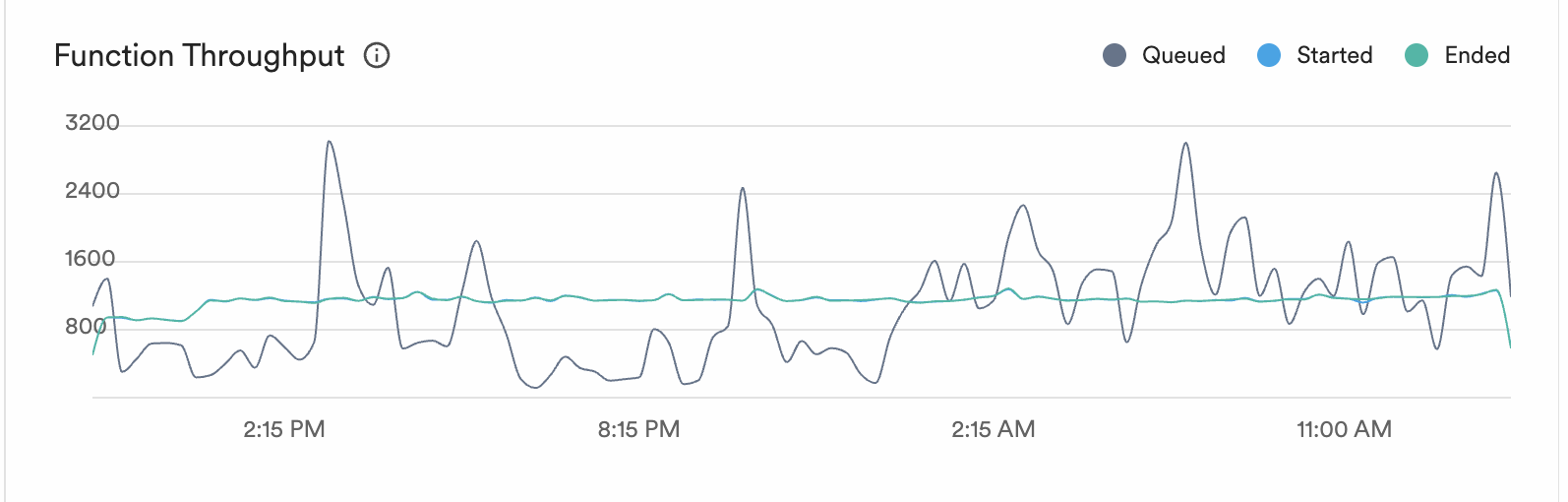
The grey line is queued work. It spikes to 3,000+ during bursts of CI activity. The blue and green lines (started and ended) stay smooth at 800-1,000. The execution engine absorbs the spikes and processes work at a steady rate.
Ingestion delay over time:
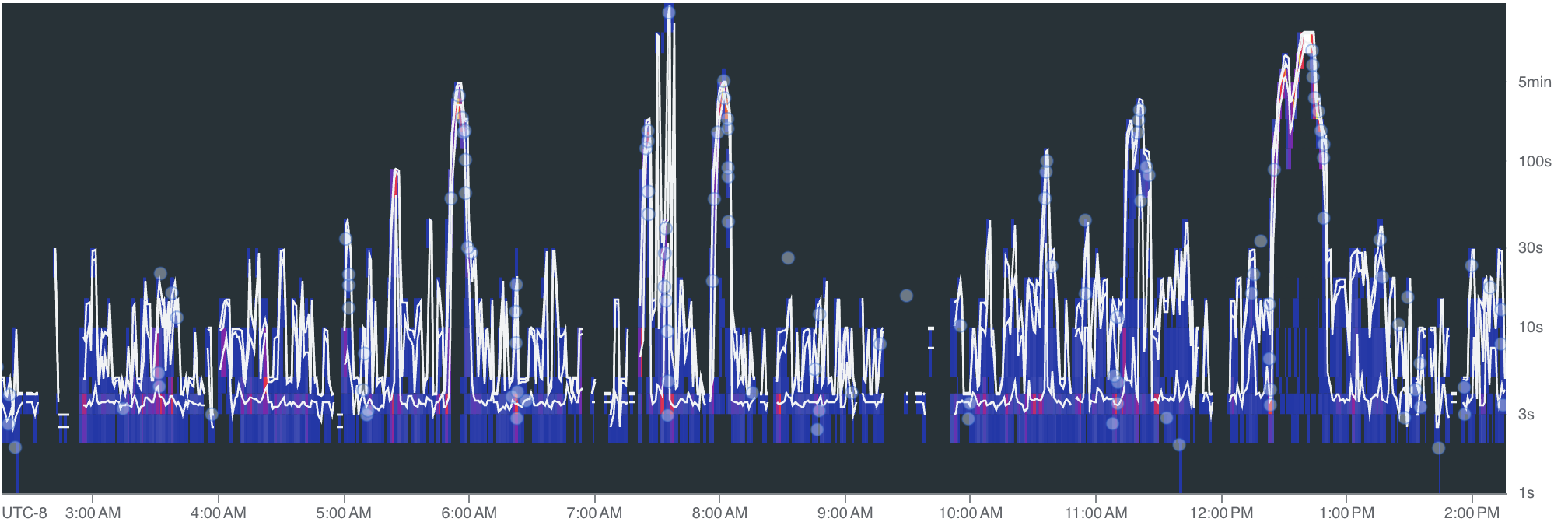
Spikes during peak activity, but the system recovers. The 5-minute P95 target holds: bursts push delay up briefly, then it drops back to seconds once the queue drains.
Nobody puts "we built a really good rate limiter" on their landing page. But without fresh, queryable data, your agent can't answer the question that actually matters: did I break this, or was it already broken?